
Mobile Hanging Problem in Android – Causes & Easy Fixes (2026 Guide)
Is your Android phone hanging, freezing, or lagging? Do not worry, you are not the only one. Here are 6 causes of your mobile hanging. Lags or freezes on Android phones can occur mainly on low-RAM devices, older phones, or when your phone’s storage is full.
What is the mobile hanging problem?
“Mobile hanging” refers to the condition in which your phone starts to behave slowly, becomes unresponsive, and freezes while using it, especially when opening apps, scrolling the screen, or using more than one app simultaneously.
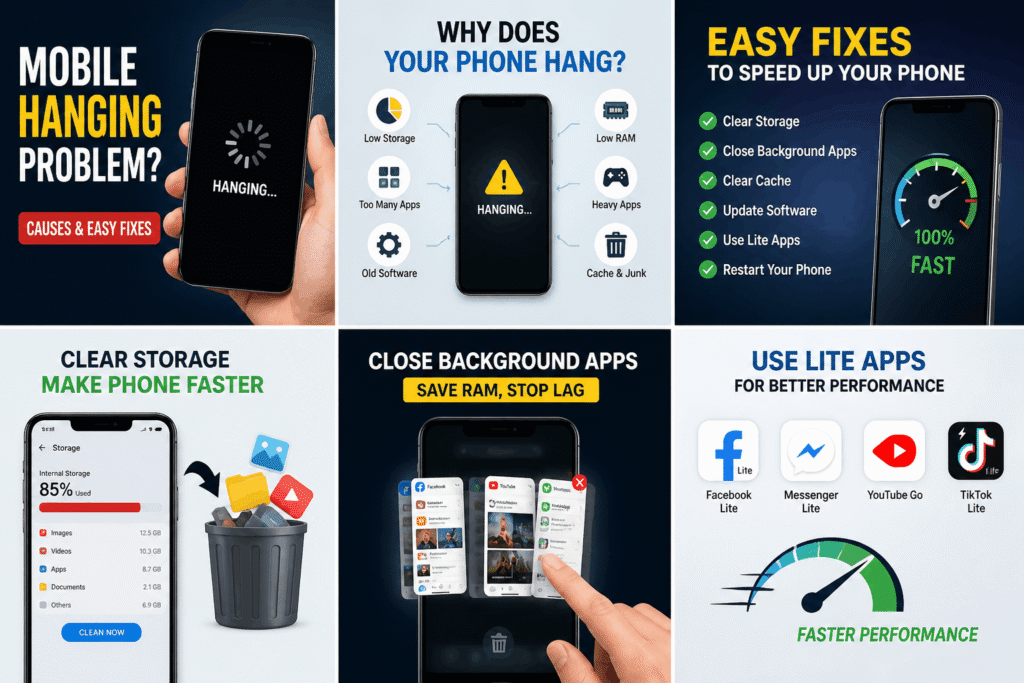
Why Your Android Phone is Hanging (6 Main Causes)
1. Less RAM (Phones in the range of 2GB-4GB)
Phones in this category usually face difficulties with heavy applications or performing many tasks at once.
2. Storage Space Almost Full
When the storage of your device exceeds 80-90%, its speed will drastically reduce.
3. Too many apps running in the background
The apps in the background consume RAM, and your phone becomes slower
4. Graphics and Gaming Apps
Games, video editors, Facebook, and so on are power-hungry apps.
5. Outdated Versions of Android
Bugs are prevalent and may degrade performance.
6. Cache and Junk Files
Temporary data will accumulate and slow down your Android device.

Android phone hanging problem fixing guide: step-by-step
Step 1: Clear mobile storage (most important)
- Delete apps that you don’t use
- Delete large videos & duplicate pics
- Leave at least 20-30% mobile space free
Step 2: Reboot your device
- Rebooting it may be used every 2 to 3 days.
- Restarting your phone removes the transient storage of your phone.
Step 3: Force stop apps that you do not use.
- Go to the recently used apps page and force stop any application that is not being used to start it.
Step 4: Clear the cache and memory files on your device.
- Navigate to Settings > Storage > Cache and consider clearing it on your phone.
Step 5: Install the updates for your smart devices.
- Navigate to Settings > Software updates to make sure it is the latest installed version.
Step 6: Use light apps (only for low-end smartphones).
- Use lighter versions like Facebook Lite, YouTube Lite, and TikTok Lite that take up less memory space.
Step 7: Disable Animations (pro move)
- Navigate to Settings > Developer Options and reduce or turn off the animation scale to change the settings on your phone.
Step 8: Factory Reset (Last Resort)
- First off, make sure you back up all the data from your phone so nothing gets erased.
- Then, perform a factory reset. This will leave your phone back to the way it was when you first got it.
Extended: Solutions for the Unique Scenario
If your mobile phone crashes while playing games, then here are the measures you need to undertake:
- Reduce the quality of the graphics settings in your game in order to cut down the demand on the phone.
- Close other running applications to free up space.
- Stop using your phone when it is charging, since this may lead to unstable performance.
In case you experience hangs whenever your phone is connected to the charger, do the following:
- Use the default charger provided by the manufacturer of the phone.
- Do not use your phone when it is charging.
If your mobile phone freezes and gets hot, consider implementing the following measures:
- Take off the phone cover.
- Do not expose your phone to heat or keep it in the sunlight.
- Close applications that consume high resources from the CPU and GPU.
No More Freezing for Your Phone!
Below are more detailed guidelines that will guarantee that your phone will not lag or freeze in the future:
- Download only the applications that you really need
- Update your phone’s operating system regularly
- Do not trust just anything downloaded from the internet; be selective when installing APK files
- Perform a restart of your phone at least once a week
FAQs
Why is my phone slow when I have lots of space available on it?
Little RAM, too many applications open, and outdated software.
Can I speed up my Android phone without factory resetting it?
Clean the cache, kill applications, turn off animations, and clear the storage space.
Factory resetting will fix my problem with the apps freezing.
Yes, it removes bugs and will speed up your phone.
Conclusion
Low RAM, full storage, and background apps can lead to this situation easily. Just take these few simple steps, and your phone will become faster and more responsive.
If your phone is also facing network issues after these fixes, check out our detailed guide on mobile network problems to solve them completely.